


New article
Recently updated
Understanding reference groups

Who is this article for?
Users who want to understand reference groups.
Manage reference groups permissions are required.
Reference groups allow you to organise and manage groups of users for easier assignment and communication, with enhanced functionality to manage document access centrally.
This reference group functionality will be included as standard in Ideagen Quality Management Professional V8, expected in the first half of 2027. Please visit Community to discuss this functionality.
Understanding how reference groups work
Instead of assigning access document by document, you define a named group — such as "Quality Team" or "Clinical Governance" — add the relevant people to it, set the permission level, and then link the group to a document type or individual record. Everyone in the group inherits access automatically.
All existing system document permissions can be assigned to a reference group, though in practice groups are most commonly used for read and view access.
When a user is added to a group they immediately inherit access to every document associated with that group at their next login. When they are removed, access is revoked at their next login. There is no need to touch individual documents.
Reference groups are managed from the People module. No system administration credentials are required, however access is controlled by the dedicated permission Manage Reference Groups which allows users to create and edit reference groups.
Accessing reference groups
To access reference groups:
- Navigate to the People module.
- Expand the Administration sub-menu.
- Select Reference Groups.
You can see all existing groups at a glance, create new ones and open any group to manage its members.
Editing a reference group
To edit a reference group:
- Click the edit icon next to the relevant group name.
The Members tab lists everyone currently in the group.
To add users to the group:
- Click Add member.
To remove a user from the group:
- Select the user.
- Click Remove (bin icon).
Changes take effect at the user's next login.
Managing members effectively
Keep groups team-aligned. Name and structure groups around real teams or functions (e.g. "Quality team", "Procurement"). Avoid groups built around individual people — they become hard to maintain as staff change.
Review membership periodically. Although access is revoked at logout for removed users, a regular review (e.g. quarterly) ensures the member list stays accurate and reflects current team structure.
Delegated management. Reference groups are managed in the People module and do not require full system admin rights. Assign ownership of specific groups to department quality leads.
Start with the document type assignment path. Linking a group at the document type level rather than document by document is the most efficient approach — one configuration covers all current and future documents of that type.
Creating a new reference group
To create a new reference group:
- Click the Create button.
- Select New Reference Group.
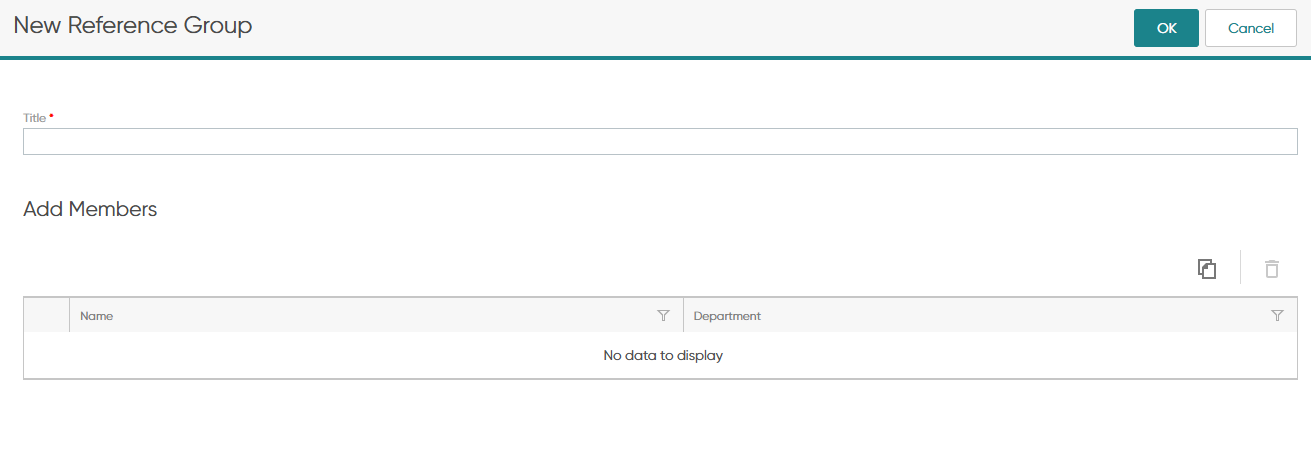
- Enter a name for the group.
- In the Add Members section, click the New icon to assign users to the group.
- Select the required users.
- Click OK.
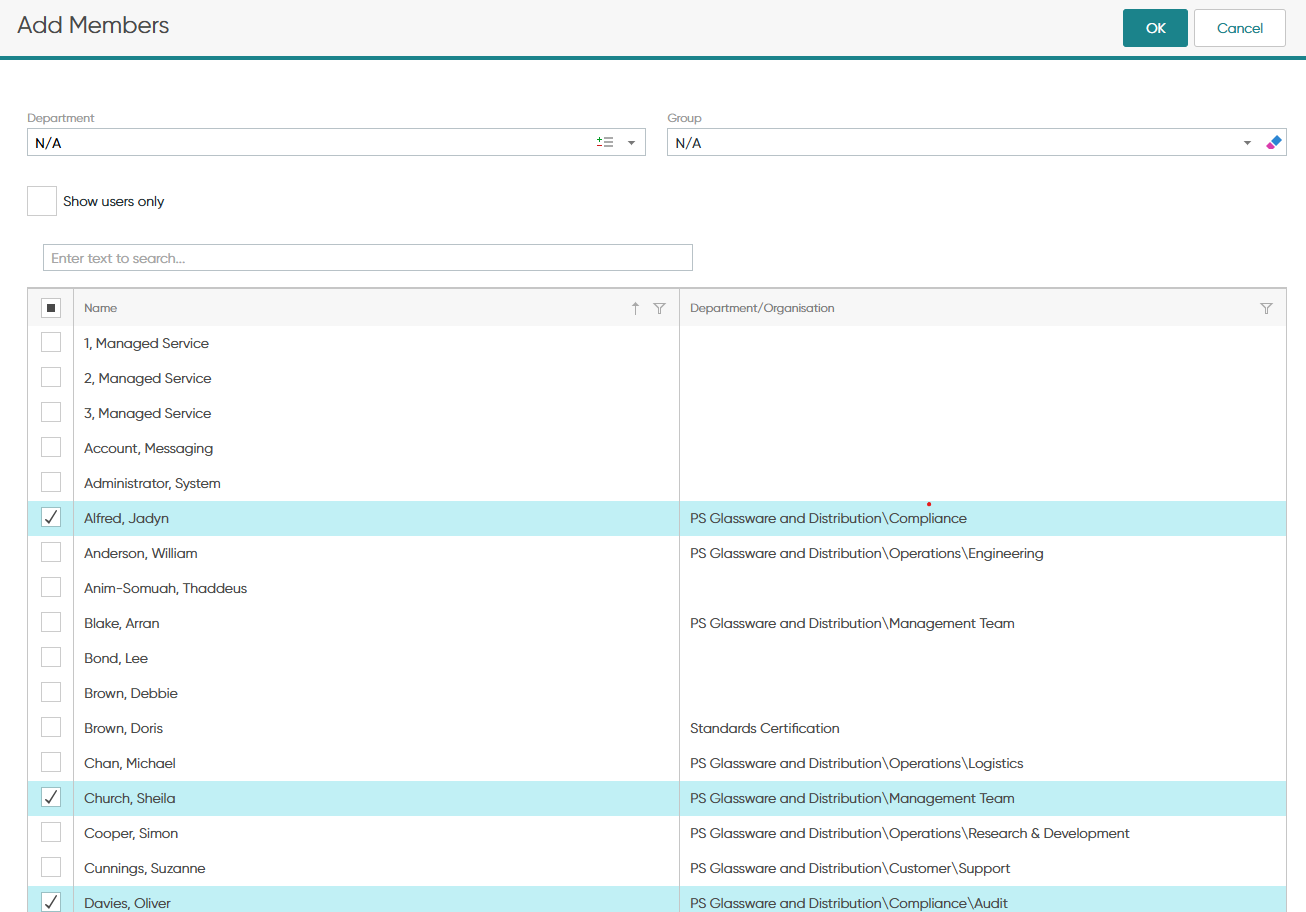
- Click OK to create the reference group.
Audit logging for reference groups
The audit log viewer in Ideagen Quality Management Professional captures all reference group activity. Every create, update and delete action on a reference group — as well as member additions and removals — is recorded, giving you a complete and auditable record of how access has been managed over time.
The following reference group events are captured in the audit log:
| Reference group event | Data captured |
|---|---|
| Group-level events | Creating a new reference group, updating group settings (name, permission level) and deleting a group are all logged with a timestamp, the acting user and the details of the change. |
| Member events | Adding a member to a group and removing a member from a group are logged individually, recording which user was added or removed and by whom. |
| CRUD events | The audit log records creates, updates, deletes, member additions and member removals — the full lifecycle of reference group activity. This supports compliance requirements and makes it straightforward to trace who has access to what, and when that access was granted or revoked. |
Understanding the difference between static security groups and reference groups
Ideagen Quality Management Professional uses two distinct permission layers that serve different purposes:
- Static security groups (system groups) control whether a user can enter a module at all. Permissions such as Document Module Access must be assigned here. These are sometimes called "prerequisite" permissions — without them, the reference group permissions will have no effect, because the user cannot reach the module in the first place.
- Reference groups operate as a second layer, applied after a user has been granted module access via a static group. They define which actions a user can perform within the module — for example, Document Read, Document View, Document Edit and so on. Reference group permissions are dynamic and travel with group membership.
Use static security groups to grant module access. Use reference groups to define what a user can do once they are inside a module.