


New article
Recently updated
CA/PA Analysis Module - Hiding Values From A Result Set

Whilst analysing data, you may wish to:
-
Hide some results from view, thus allowing you to concentrate on others or;
Hiding Values from a Result Set
Above the graph displaying your Result Set, a list of the column headings is displayed, together with the number of instances in heading:
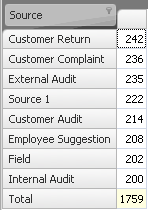
-
To hide the values, click the icon. A list of all the columns will appear, each beside a checkbox.
-
To hide a column, make sure the box beside the column name is unticked.
-
To tick / untick all the column names, tick the (Show All) box at the top of the list.