


New article
Recently updated
Report Designer Example: Displaying a Name in the Format 'Firstname Lastname' in Report Designer

To change a user or supplier name so that it displays the name in a different format within Report Designer:
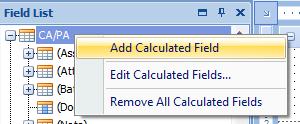
- Right click on the Field List section in report designer, and select [Add Calculated Field]:
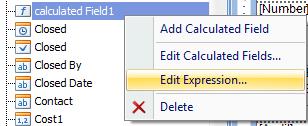
- Then select your calculated field, right click and select [Edit Expression]:
- Add the following text to the Expression Editor section:
Concat(Substring([Owner],CharIndex(',',[Owner])+1),' ',Substring([Owner],0,CharIndex(',',[Owner])))
- Click [OK].
- Add your calculated field to your report where you wish this field to be displayed.