


New article
Recently updated
Using Postman to post attachments into Occurrence Records

Postman is an app for Google Chrome that allows you to post files into records using the QPulse5WebServices.
Using Postman to post attachments into Occurrence records:
Firstly enter the following link into the postman address bar - http://<servername>/QPulse5WebServices/services/attachment.ashx and change the function at the left to read, "Post".
Click on the headers section and add the following keys and their corresponding values. See screenshot for reference
Operation - Upload
Token - Users Authentication Token. You will have to use SOAPUI to retrieve this.
ObjectType - Occurrence
ObjectID - (enter the ID of the Occurrence you wish to post to)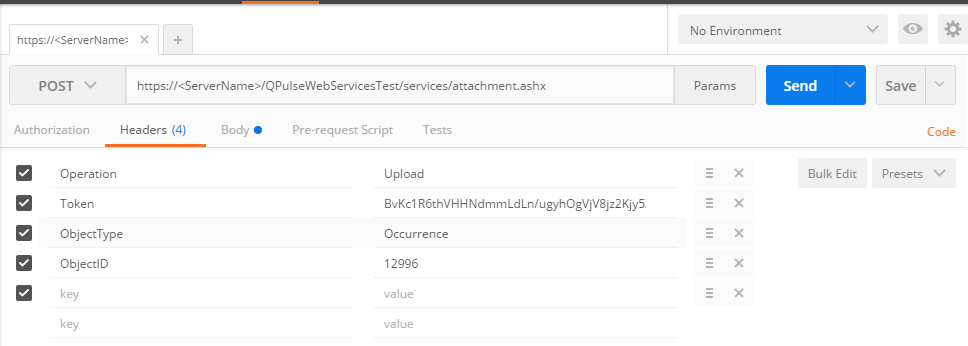
In the Body section add the following Keys and their corresponding values. Pleas see screenshot for reference.
Contents - ( Change the "Text" trop down at the right of the value field to "File" this should change the value field to a "Choose Files" field.)
Name - File. 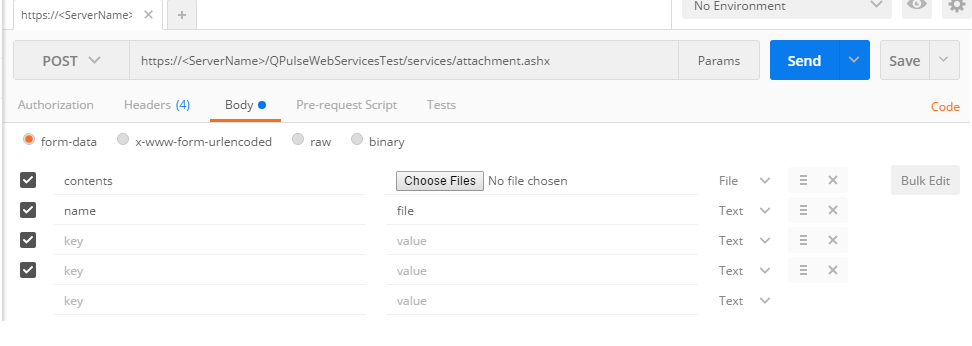
When the file is selected, click the send button.
If successful this will upload the file to the Occurrence that you selected.